当サイトの運営者です。ゲーム制作とプラグイン開発が好きで、コミュニティに貢献したいと考えています。
RPGツクールMZでゲームを制作中です。
※プログラマ・エンジニアではありません。
RPGツクールMV用プラグイン投稿・告知サイト

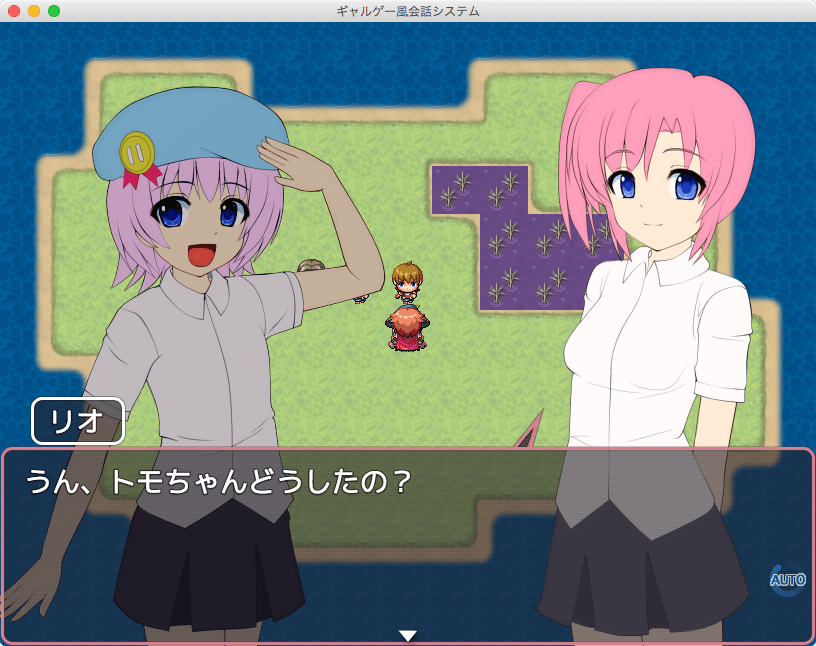
▼Saba Tachie(さば缶様作) - Saba_Tachie.js
https://plugin.fungamemake.com/archives/10315
立ち絵を簡単に表示します。別途画像が必要
ふりがな:たちえ
機能概要: 立ち絵を簡単に表示します。別途画像が必要
利用規約(ライセンス): MITライセンス
作者:さば缶
作者サイト:https://x.com/sabakan03
解説ページ:https://web.archive.org/web/20190312192826/http://petit…
直接ダウンロード:Zipファイルダウンロードページ:https://raw.githubusercontent.com/sabakan03/mv/master/P…
ファイル名:Saba_Tachie.js
プラグインのヘルプ:
/*:ja
 * @author Sabakan
 * @plugindesc 立ち絵を簡単に表示するプラグインです。別途画像が必要です
 *
 * @param disablesTachieActorIdList
 * @desc 立ち絵を使わないアクターの ID のリストです。(カンマ区切り。 1, 2, 3...)無駄な読み込みをしないための設定です。
 * @default 0
 *
 * @param leftPosX
 * @desc 左側に立つ場合のx座標です
 * @default 0
 *
 * @param rightPosX
 * @desc 右側に立つ場合のx座標です
 * @default 400
 *
 * @param centerPosX
 * @desc 中央に立つ場合のx座標です
 * @default 200
 *
 * @param posY
 * @desc 全員のy座標です
 * @default 0
 *
 * @param actor1offset
 * @desc アクター1のキャラのx座標,y座標の補正値です
 * @default 0, 0
 *
 * @param actor2offset
 * @desc アクター2のキャラのx座標,y座標の補正値です
 * @default 0, 0
 *
 * @param actor3offset
 * @desc アクター3のキャラのx座標,y座標の補正値です
 * @default 0, 0
 *
 * @param actor4offset
 * @desc アクター4のキャラのx座標,y座標の補正値です
 * @default 0, 0
 *
 * @param actor5offset
 * @desc アクター5のキャラのx座標,y座標の補正値です
 * @default 0, 0
 *
 * @param actor6offset
 * @desc アクター6のキャラのx座標,y座標の補正値です
 * @default 0, 0
 *
 * @param actor7offset
 * @desc アクター7のキャラのx座標,y座標の補正値です
 * @default 0, 0
 *
 * @param actor8offset
 * @desc アクター8のキャラのx座標,y座標の補正値です
 * @default 0, 0
 *
 * @param actor9offset
 * @desc アクター9のキャラのx座標,y座標の補正値です
 * @default 0, 0
 *
 * @param actor10offset
 * @desc アクター10のキャラのx座標,y座標の補正値です
 * @default 0, 0
 *
 * @param messageNumLines
 * @desc テキストの行数です
 * @default 3
 *
 * @param balloonEnabled
 * @desc ウィンドウに吹き出しをつける場合、trueにします。
 * @default true
 *
 * @param windowColor
 * @desc 各キャラのウィンドウカラーの配列です(0だとデフォルト色)
 * @default 3, 0, 1, 2, 1
 *
 * @param enableFaceLayer
 * @desc actor01_face_1.png などのレイヤーを使う場合 trueにします
 * @default true
 *
 * @param enableBodyLayer
 * @desc actor01_body_1.png などのレイヤーを使う場合 trueにします
 * @default true
 *
 * @param enableHairLayer
 * @desc actor01_hair_1.png などのレイヤーを使う場合 trueにします
 * @default true
 *
 * @param enableOuterBackLayer
 * @desc actor01_out_b_back_1.png などのレイヤーを使う場合 trueにします
 * @default true
 *
 * @param enableOuterMainLayer
 * @desc actor01_out_b_main_1.png などのレイヤーを使う場合 trueにします
 * @default true
 *
 * @param enableOuterFrontLayer
 * @desc actor01_out_b_front_1.png などのレイヤーを使う場合 trueにします
 * @default true
 *
 * @param useTextureAtlas
 * @desc バラバラの画像でなく、一枚のアトラス画像を使うか? TexturePackerを使い、actor01.png actor01.json などが必要です
 * @default false
 *
 * @param skipKey
 * @desc メッセージスキップに使うボタンです。tab, shift, control, pageup, pagedown などが使えます。
 * @default control
 *
 * @param windowHideKey
 * @desc ウィンドウ消去に使うボタンです。tab, shift, control, pageup, pagedown などが使えます。
 * @default shift
 *
 * @param autoModeKey
 * @desc オートモードのON/OFFに使うボタンです。tab, shift, control, pageup, pagedown などが使えます。
 * @default
 *
 * @param autoModeDelayPerChar
 * @desc オートモードで、1文字ごとに増える待機時間です(ミリ秒)
 * @default 110
 *
 * @param autoModeDelayCommon
 * @desc オートモードで、1ページで必ず待つ時間です(ミリ秒)。全体の待機時間は autoModeDelayPerChar * 文字数 + autoModeDelayCommon です
 * @default 2000
 *
 * @param autoModeMarkFrameNum
 * @desc オートモードであることを示すマークのアニメ枚数です
 * @default 18
 *
 * @param autoModeMarkX
 * @desc オートモードであることを示すマークのx座標です
 * @default 770
 *
 * @param autoModeMarkY
 * @desc オートモードであることを示すマークのy座標です
 * @default 115
 *
 * @param inactiveActorTone
 * @desc 喋っていない方のキャラの Tone です
 * @default -80, -80, -80, 0
 *
 * @param toneChangeDuration
 * @desc 喋っていない方のキャラの Tone を変える時の時間です
 * @default 25
 *
 * @param nameLeft
 * @desc 名前の表示ウィンドウの左の領域です
 * @default 30
 *
 * @param fontSize
 * @desc メッセージウィンドウのフォントサイズです
 * @default 28
 *
 * @param windowMargin
 * @desc メッセージウィンドウの表示位置の空きです。上、右、下、左の順です
 * @default 0, 0, 0, 0
 *
 * @param windowPadding
 * @desc メッセージウィンドウの文字と枠の空きです。上、右、下、左の順です
 * @default 0, 0, 0, 0
 *
 * @param newLineXWithFace
 * @desc 顔グラを表示している時の、テキストの x 座標です
 * @default 168
 *
 * @param messageFacePos
 * @desc 顔グラの表示位置です。x y の順です
 * @default 0, 0
 *
 * @requiredAssets img/system/Tachie_Window1
 * @requiredAssets img/system/Tachie_Window2
 * @requiredAssets img/system/Tachie_Window3
 * @requiredAssets img/system/Tachie_Window4
 * @requiredAssets img/system/Tachie_Window5
 * @requiredAssets img/system/Tachie_Window6
 * @requiredAssets img/system/Tachie_Balloon1
 * @requiredAssets img/system/Tachie_Balloon2
 * @requiredAssets img/system/Tachie_Balloon3
 * @requiredAssets img/system/Tachie_Balloon4
 * @requiredAssets img/system/Tachie_Balloon5
 * @requiredAssets img/system/Tachie_Balloon6
 * @requiredAssets img/system/Tachie_Balloon6
 * @requiredAssets img/system/Tachie_Auto
 * @requiredAssets img/tachie/actor01_01
 * @requiredAssets img/tachie/*
 *
 * @help
 * Ver 2016-08-19 20:18:21
 *
 * 左側に立つキャラは、pictureId 11 のピクチャで表示しているので、
 * イベントコマンドで pictureId 11 を対象とすることで操作できます。
 *
 * 同様に、右側に立つキャラは、pictureId 12
 *
 * ■画像の設定方法
 * img/tachie フォルダを使います。
 * ここに、全キャラ分の立ち絵画像を入れてください。
 * ※「未使用ファイルを含まない」には非対応なので、
 *  手動でコピーしてください。
 *
 * 以下、アクター1の場合の例です。
 *
 * actor01_<<表情ID>>.png
 *  →表情
 * actor01_body_<<ポーズID>>.png
 *  →体
 * actor01_face_<<ポーズID>>.png
 *  →後ろ髪
 * actor01_hair_<<ポーズID>>.png
 *  →頭
 * actor01_hoppe.png
 *  →ほっぺ
 * actor01_in_<<衣装ID>>_bottom.png
 *  →パンツ
 * actor01_in_<<衣装ID>>_top.png
 *  →ブラ
 * actor01_out_<<衣装ID>>_front_<<ポーズID>>.png
 * actor01_out_<<衣装ID>>_main_<<ポーズID>>.png
 * actor01_out_<<衣装ID>>_back_<<ポーズID>>.png
 *  →上着
 *
 * 必要ない場合でも、画像をよみに行ってエラーになる場合があります。
 * その場合、透明な画像を入れておいてください。
 *
 *
 *
 * プラグインコマンド
 * Tachie showLeft  actorId x y opacity  # 立ち絵を左側に表示する
 * Tachie showRight actorId x y opacity  # 立ち絵を右側に表示する
 * Tachie showCenter actorId x y opacity # 立ち絵を中央に表示する
 * Tachie hideLeft                      # 左側の立ち絵を非表示にする
 * Tachie hideRight                     # 右側の立ち絵を非表示にする
 * Tachie hideCenter                    # 中央の立ち絵を非表示にする
 * Tachie face      actorId faceId      # アクターの表情を変更する
 * Tachie pose      actorId poseId      # アクターのポーズを変更する
 * Tachie hoppe     actorId hoppeId     # アクターのほっぺを変更する
 * Tachie outer     actorId cosId       # アクターのアウターを変更する
 * Tachie innerTop     actorId cosId    # アクターのブラを変更する
 * Tachie innerBottom  actorId cosId    # アクターのパンツを変更する
 * Tachie preload      actorId          # アクターの現在のコスを事前に読み込んでおく
 * Tachie preloadFaces actorId 1 2 3... # アクターの表情を事前に読み込んでおく
 * Tachie notClose on                   # ウィンドウを閉じないようにする
 * Tachie notClose off                  # ↑を解除する
 * Tachie showName hoge                 # 名前欄に hoge を表示する
 * Tachie hideName                      # 名前欄を非表示にする
 * Tachie clear                         # 立ち絵を全て非表示にする
 * Tachie hideBalloon                   # 一時的に吹き出しを非表示にする
 * Tachie deactivateAll                   # すべてのキャラを暗くします
 *
 * @license
 * Saba_Tachie licensed under the MIT License.
 */
当サイトの運営者です。ゲーム制作とプラグイン開発が好きで、コミュニティに貢献したいと考えています。
RPGツクールMZでゲームを制作中です。
※プログラマ・エンジニアではありません。
Copyright© #ツクプラ , 2026 All Rights Reserved.